Showing posts with label e-Learning. Show all posts

Thursday, February 14, 2008

Want to be a cartoon master?

If you have the wish to become a 'Cartoon Master', you can start with this funny and interesting e-Learning module.

You can walk through this tutorial for free and will learn all the basic principles on how to create cartoon like animations. It is a clear explanation with a great use of animations to explain the concepts. The style of this tutorial is fun but it also holds sound information.

So if you are using cartoon animations for e.g. you digital storytelling, this one is for you. If you are interested in the use of animations to explain concepts, this is also an example for you.

They also promise a new tutorial on how to create animations on the computer, I can't wait! Beep beep, here I come!

Saturday, January 26, 2008

The Visible Body!

Thanks to the blog of Jane Hart, I discovered the rich world of the website The Visible Body. The creators saying it "is the most comprehensive human anatomy visualization tool available today."

After registering for free and downloading some Active X controls, the draw back is that it only works with Internet Explorer. For me this is a problem because I cannot get IE stable since I installed 7.0.

But what a rich model of the human body! Especially for students and teachers of biology this is a great resource. It would even be better if you could add some interactivity as a teacher but the creators are promising a lot of more features; one example is the use of quality animations. So who knows what is next.

This site hold a lot of promises. So let's combine it with the ideas within the BBC page about the human body and another powerful learning experience is there!

Friday, January 11, 2008

WBTs on e-Learning for free!

During the European project Fe-ConE, we developed 6 WBTs about e-Learning. This was not the goal of the project but a way to do research. The 6-week course on e-Learning Fundamentals hold a lot of didactical activities and one of them was a kind of old fashioned WBT.

I host 3 of the 6 WBTs (in English) on my own Dutch Blog, please feel free to look at them. These are not the best I could do (due to extreme time constraints) but maybe you will find it useful.

BTW: all the learning materials are published under Creative Commons licenses so let me know if you want to re-use it. I have the files in native eXe format.

> WBT “e-Learning Basics”

> WBT “e-Learning Tools”

> WBT “e-Learning Trends”

Enjoy!

Friday, December 07, 2007

The Big Question: What did you learn about learning in 2007?

The Big Questions...asked by The Learning Circuits Blog from the ASTD. The big question is: What did you learn about learning in 2007? You can also answer this question on your blog. Pass it on!


And as we educational people know, reflection is an important 'learning aid'. It can make your learning more explicit and you have to put things in place and while your reflecting, you almost feel the transfer to your everyday life and tasks.

So I decided to grap this change to put my feet on the table and try to get back all the powerful learning insights from 2007.

I used the Pecha Kucha format again because that is such a good way to focus your mind and to force you to stick with the core message.

Please watch it (in English or Dutch) and leave your comments or answer The Big Question on your own blog or in the comments!

English:


Dutch:

Wednesday, October 24, 2007

e-Learning for a Worldwide Audience > Learning 2007

Our session at Learning 2007
Today was the big day for Erika and me because we had our session about multicultural e-Learning. It was great! We had an interesting group of people that discussed with us the implications of different cultural dimensions on e-Learning. As you know we used the model of Hofstede to define guidelines for instructional design of e-Learning for a multicultural audience. You will get more info on this when we will be finishing the Fe-ConE project. I will publish some nice and rich materials on this blog. In the meanwhile you can go to the site of our session today to get the hand-out with some practical information: www.learningwiki.com/739


People working really hard to find out about cultural aspects

Wikinomics

For the rest I went to a session of Don Tapscott. This author of Wikinomics has some interesting points on the netgeneration but it was not really new to me. The new focus was on Talent 2.0. I think this comes very close to the thesis of Joost Robben. Basic message was that for young people there is a thin or no line between work/entertainment/learning. The working environment should be fun, collaborative, customizable, authentic and fast.

Some extra nuggets of info
I went to a nice session on the use of storytelling and in particular about the educational use of Manga. This was a inspiring session and you will see more on this on my blog in the next months. I used cartoons for educational use a few times and we are now working on a cartoon kind of learning for a customer.

Wayne Hodgins was announcing a new and independent organization that will take over the role of ADL. This is the organization behind the learning standard SCORM. Because this is a worldwide used standard the learning community wants to take it away with the defence orientated ADL.

Last thing I visited was a good session (PIT training) that offers a learning experience with a real racecar. I had the same experience at the ISAGA conference. Probable an engaging way of learning although we missed the real debriefing and transfer of the regular training. Check out the video.


Last thing that interest me was the use of HD videoconferencing over the internet that was used by the Manhattan School of Music. They are using this quality connection to teach musical lessons. The called it an export and import of educational resources. Very interesting. They needed high quality because of the importance of the details. Check this student (although this is no HD after YouTubing ;-))

Sunday, September 16, 2007

Teaching is powerful learning!

Last week I was facilitating a session about designing effective learning experiences for the Council of Europe. I struck me how much I'm learning from the teaching itself. Even after 10 years of teaching and presenting it is so much fun to do it! And every time I'm picking up new insights because of the interaction with participants. Every time I find some aspects that can be improved the next time. Teaching and presenting is like playing a game. While playing you find the nuances in the rules and you like the game even more than before.

What I also realised was the fact that 'learning' is so personal that you can touch people when you are talking about learning. I did the 'close your eyes' exercise again and I was impressed by the outcomes again. WOW. It is relative easy to create an engaging experience when the subject is 'learning'.

Maybe we have to use teaching as a didactical form(at) more often. Teaching is learning and is remembering. You cannot teach if you don't understand the essence of the subject. Doing a presentation forces you to perform to your limits.

The next months I'm presenting a few public sessions, so feel free to join me and let's learn together!

At Learning 2007, the e-Learning congress organized by the Masie Center, I will host a session with the title: "e-Learning For A Worldwide Audience". In this session I will talk together with my colleague Erika Spoelma, about the cultural aspects that have to be taken into account when you are designing for a multicultural audience. Learning 2007 will be held from 21-24 October in Disneyworld, Orlando, Florida. More details on their website.

At the National e-Learning Congress I will facilitate a session about how to create powerful learning experiences. The three hours workshop will be held at 24 of January (see for details the website).

Monday, September 03, 2007

Thesis: "Learning environments for Net-generation learners"

Last week Joost, a colleague of mine, got his masters degree. If you are interested in Net-generation learning, this thesis will be useful for you.


Based on a written questionnaire among 224 students of preliminary vocational education in The Netherlands, the paper explores the use of digital media and web technology and the characteristics of Net-generation learners as being the next generation of workers. Two developments in digital media and web technology have been taken into account: 1) virtual social networks and 2) multi-user virtual environments.

Although it was a scientific research the approach was very practical. And we can use a bit insight in these field because you cannot project the US based research findings that easy on a Dutch situation.

For me what was new to hear was the penetration of the use of instant messaging amongst this target group, it was almost 100%. The target group comes from a lower socio-economic background (below average) and you could expect a lower use of PC's at home. This was not true.

I think Joost did some nice research and he answered some interesting and relevant questions. For me the remaining questions are:

  1. What will happen if we use the Net-gen methods within a corporate learning environment? Will it lose its positive impact?
  2. What is the importance of the learner as an active creator?
Maybe some new research questions?

Congratulations Joost!

Check his research: Learning environments for Net-generation learners

Check his presentation:


For more, please visit his blog.

Sunday, August 26, 2007

Free -non OSS- authoring tool

A new and very nice piece of software is hitting the streets. It is a Russian tool to create WBTs and it is fast, easy and it is for free. I tried to contact the vendor but my mail came back with an error message. The tool is called CourseLab.


So it is free – I guess it is limited?
Actually, NO! This application is quite advanced. There are a lot of functionalities and templates you can use. The course can be exported as a SCORM package (both 1.2 and 2004), as an AICC package or on a CD. There are no limitations to the number of screens and you don't see a watermark. No idea why they are using this model but as long as it works, it is fine to me.

What about the functionalities?
It is an advanced authoring tool to create WBTs. With a lot of ready to use templates and a various set of didactical interactions. From simple questions, to interactive conversations. It is even possible to create simulations (although you need to buy an additional module). And it is very easy to use movies or Flash/Shockwave elements. Every instructional designer will be able to create pages at a fast pace.

Is it hard to use?
No, the user interface is very clear. If you know how to use Microsoft applications, you can use this one as well. The same menus, the same buttons. You can even move objects to a different layer in exactly the same way. The learning curve is not steep at all. Without any help I created a simple interactive conversation within 5 minutes. You can even import current PowerPoint presentations (although this will be a very bad starting point!). If you need additional info you can use the solid build in help.

So?
Just try this one. And if anyone can tell me about their business model...please let me know. I'm curious.


Thursday, August 16, 2007

Capture and share your applications

When learning to work with a certain application I like to watch some screen casts. I bought Final Cut some weeks ago and it helps me to understand some of the more complicated features.

And within Stoas we are using simulations a lot for our customers who want to train people how to use a certain application. Or to support them on the work place with small simulations. Some times we just do this the hard core way with programming it in code, sometimes we use screen capturing applications like Captivate. With this application you can do almost everything you want.

Now I'm also using a very simple application: Jing (from TechSmit, who are also selling Camtasia). You can download it for free for both Mac and PC and you can create screenshots (a window or part of a window) or screen casts. You can just hit the record button and it is capturing the action including the audio. The special thing is that you can share the picture or movie right away. It is published on the server and the url is copied into your clipboard. Just send the url and your friends can watch it. Easy and fast way to explain something fast.


Just watch this (bad) example: http://www.screencast.com/t/NWEWnIftj4

Monday, July 16, 2007

A computer program that reads human expressions


Used for marketing reasons
Dutch researchers from Unilever using software that reads human expressions recently for a consumer test project seconded what wise men have always known: Sweets are the surest way to make a woman smile. Marketers increasingly use technology to determine what gives consumers bliss. Food and consumer goods giant Unilever, which used brain scans to demonstrate why we all scream for ice cream, hired software developers Theo Gevers and Nicu Sebe from the science department of the University of Amsterdam to run the European tests after reading about their experimental work deciphering the Mona Lisa's smile.

Emotions in learning experiences
Although this computer program is used for marketing reasons this could be an interesting tool for learning as well. I'm convinced that (e-)Learning can only have a learning effect if the learning activity is very involving. Emotions are important. Most self study e-Learning courses don't pay attention to the emotional needs of learners.

What is the learning experience you remember?

Probably it made an impression in different ways, not only on an academic level but it also moves you on an emotional level. It touched you. A great teacher can do this. Great e-Learning course as well but this kind of emotion recognition software could help us to optimize the interactivity. It could make the computer more human and make the learning experience more adaptive and memorable.

Wednesday, July 11, 2007

Live broadcast: exciting learning!

During the last week of the international 'e-Learning Fundamentals' course I decided I wanted to have an extra presentation about designing educational games. A few weeks before I found out about the possibilities to host a free streaming video broadcast. I used Ustream.tv. You need a web cam and a mike and that is it. After registration you can set up a live show within 1 minute. You can send around a url or you can embed the code in your weblog or learning environment (like you can do with a YouTube video).


My own 30 minutes of fame
I scheduled a 30 minute show and embedded the screen in Moodle. During the show you can chat with your audience. I downloaded an additional application that offers me the functionalities to share images and to add titles, a count down timer etc. It seems to work fine although some people couldn't connect to the server. You can also record your show. Great that you can sign up for free, bad thing is that it was not functioning as expected.

operator11
Another variation of this is operator11. This website also offers you free streaming shows. But you will have some different functionalities. As a host you can give the stage to other participants (colleagues or learners) and they can present.


Exciting for learners and you
These websites are promising for education. I really want to use it again with a group of learners. It is exited to have your own show and to be 'on the air'. Everybody dreams to be on TV while growing up. Feel the energy and try this with your students. The synchronous aspect really add some excitement to your learning experience. Get envolved!

Monday, June 25, 2007

Review eXe authoring tool

I already posted about the eXe authoring tool for creating WBTs. The last 6 weeks I developed 6 WBT's with the tool. This review is about version 0.24, on both the Mac and the PC. This week version 0.95 was released.


Ease of use

The tree structure on one hand side and the edit pane on the other one makes it a clear and clean environment. eXe opens in FireFox. If you have a basic understanding of Windows or Mac OS it will be easy to start with eXe. A basic knowledge of HTML comes in easy because although it is a kind of WYSYWIG editor sometimes you need some code to clean things up or to correct some flaws. For the rest it is not hard to work with eXe. It speaks for itself and it is consistent. Creating a structure is the same as creating folders, three levels can be used. Moving pieces of the content to other places is very easy. That is sufficient for most content. There is a help function but that is quite limited. If you need to know more you can visit fora. Adding metadata and exporting the content into SCORM packages or other packages.

Functionalities
With eXe you can create attractive WBTs. You can easily add different and attractive learning interactions. You can add some question types, some reflection activities, images, add RSS, you can integrate web pages, MP3 and also video. And many more. Video has to be in an flv format. In the version I used (0.24) it was kind of a hassle. And for my Mac it was not available. Still the Windows version has the most functionalities but with the 0.95 version, the difference is not that big anymore. The so-called iDevices do the things they are promising. Sometimes they can be improved, e.g. the one where you can show a row of images. First of all you have to select and upload them one for one, but if you open them in the WBT you need to click twice to enlarge them. Some learners even didn't find the second click.

I also miss some basic functionalities. I missed simple things like anchors. It would have been nice to be able to create anchors (e.g. you sum up some subjects in a list and you want to jump to a certain point on the page of you click on subject 1, 2, etc.). This can be done now but you have to use HTML. I also missed hotspots.

But hey, with some smart things you can do a lot. You can copy code from different places. I embedded code from YouTube, Zoho polls and Blip.tv. I also tried to use HotPotatoes but that didn't work.

Technical performance
During the hundreds of hours I worked with it, I only had one crash. The first weeks I made a stupid (?) mistake by closing the FireFox browser when I wanted to close eXe. That causes a crash. You have to close the application by using the menu.

I was using a standard standardwhite style. That worked fine. Only a few flaws where some white space was added between the iDevices. I still don't know what happened and I couldn't correct it because in the source code I couldn't see.

Version 0.95
In this mayor update the possibilities seems to be significant improved. The simple thing I like the most is the possibility to embed images within text fields (wish I had that a few weeks earlier). Also the video and SCORM-quiz possibilities are available for the Mac OSX version. New is also the JAVA-applet iDevice.

Conclusions
A nice and easy to use application to create your own WBTs. It doesn't has the possibilities (yet) as some of the commercial applications like Lectora or AuthorWare but if gives you the opportunity to develop interesting e-Learning modules in a fast way. Especially if you are new to e-Learning development I would like to advice you to start with eXe. And if you are an experienced instructional designer: keep an eye on this project because during the 6 weeks I was using it, 2 updates were introduced. eXe is becoming a mature tool.

Thursday, June 21, 2007

New interface, new learning?

Microsoft is catching some attention by their new interface: Surface. Actually for me it was not such a revolutionary interface because I saw a presentation on TED with the same ideas.

Anyway, it could be a nice interface for learners as well. It looks quite easy to use, I think it will get high scores on usability tests!

But I also see the limitations. For pictures and stuff like that it looks great and it is easy to see the additional value. The same for drawings. But what if we want to use a learning environment? How can we do that? And how can text be entered? Can it work for video editing as well? And would it also be useable if the screen was not the size of a table?

Some critic is also shared by a guy who put a parody on YouTube:


If you want to see Jeff Dan on TED last year with a great (life) demo, please watch the video!

Friday, June 08, 2007

176 $ laptop will boost education world wide?

'One laptop per child' is a non-profit organization founded by Nicholas Negroponte. They were planning to give the world an easy to use, 100$ laptop.

Their goal:

To provide children around the world with new opportunities to explore, experiment and express themselves. The further say that the laptop is a potent learning tool created expressly for the world's poorest children, living in its most remote environments.


The machine is using open source software (e.g. it is using elements of Red Hat's Fedora Core 6 version of the Linux operating system) and is promising a very user-friendly experience. The laptop creates its own mesh network out of the box. Each machine is a full-time wireless router. Children in the most remote regions of the globe—as well as their teachers and families—will be connected both to one another and to the Internet.

This week Negroponte was speaking at a Harvard University conference and he talked about the groups of children in Nigeria, Thailand and Uruguay who are using the laptop already. At the end of the year the plan is that 1.000.000 laptops are produced every month. The price has to reach the famous 100$ level in 2009 again.

Love this initiative and I hope this will bring a lot of joy and learning to kids all over the world.

Please visit the website or the wiki to see if you or your organization can support the project in any way.

See http://www.laptop.org/
or the wiki: http://wiki.laptop.org/

In the wiki you can also help the project by creating content!

Tuesday, May 29, 2007

Learning creators → LearnTube?

One of the learners from the course e-Learning Fundamentals (the course we designed for the European Commission) was talking about the big IT hurdle: teachers still are lacking some IT skills that are needed to implement e-Learning.

Wow, I remember I was facing the same problems 10 years ago. How slow and frustrating this can be! In the meanwhile the learners don't even understand what we are talking about. What hurdle? One big example is the use of video. I love the way people are using video nowadays. When I was creating instructional video's (and CD-i) for the first time you needed a serious analog editing set. Very expensive. Now you just need a PC or Mac. Your build in cam is there, iMovie or Microsoft Movie Maker is there to assist you. Combine the editing possibilities with a platform like YouTube and you have a powerful learning tool.

People start creating videos, they are telling their stories. People like to learn each other something. People like to share their passion, their experience, their feelings. HOW GREAT!

See for example the next movie, one of my favourites. Watch how well this guy explained his story. What a didactical genius! Who wants to hire him as an instructional designer? Check his graphics!


Or look at these two people, they are showing us how to play guitar! People asked them to explain how to do it. Enjoy your free course.


Or learn how to Jump. If you like a different style of music:


For me what is amazing is that YouTube doesn't really has a category 'Education'. Or maybe that's why there are so many educational videos ;-) As long as we don't call it 'education' or 'learning' people are just doing it!

Now a site is filling that gap and offers a kind of educational interface for YouTube content: http://www.teachertube.com/ And don't forget to visit http://www.teachers.tv/

But one of the sites I love the most is VideoJug where you can learn how to unblock a toilet and many more things.

If you finding this boring and you want to add some spice to the learning process and you like nice ladies you should check out a silly site: http://www.frenchmaidtv.com/.


Learning is about emotion! And fun, and passion.
It can be easy, rewarding and fun to create, and share, and learn. Maybe somebody can explain on VideoJug how to get over the IT hurdle? Or just forget about technical stuff and start focussing on didactical power?

Tuesday, May 22, 2007

The passion of Nick van Dam

Nick van Dam is author of The e-Learning Fieldbook and the Global Chief Learning Officer of Deloitte Touche Tohmatsu. It is an organization of member firms around the world. Member firms offer services in audit, tax, consulting and financial advisory. With access to the intellectual capital of approximately 150,000 people worldwide, member firms focus on client service through a global strategy executed locally in nearly 140 countries.


Nick @ Learning2005 talking about e-learning For Kids.

Nick was with the special guest at our (Stoas) e-Learning Round Table event. A recurrent event with CLOs and HR presidents of big international organizations and governmental organizations. It is a selected group of about 10 people. It was a privilege to join this group of visionaries.

Nick has a nice and sound story about development of talents and learning within big organizations. Beside this he is the founder of e-Learning For Kids, a non-profit foundation to support learning amongst youngsters.

One of the challenges of Deloitte is to attract new talent. As the say in their 2010 Talent Vision: "To be the first choice of the most coveted talent-the place where the best choose to be." Nick told us that new employees are really looking for personal learning and development possibilities. On the other hand: also Deloitte and their customers are looking for people with better competencies every year. A great employee is not necessary a great employee in 3 years. The world and the demands are rapidly changing.

For me the interesting part was that Deloitte is a very service based organization where human capital is all there is. In that case I think that a lot of other companies and institutions will feel the same urge as Deloitte to attract the talented people. In Europe we will face (and for some professions this is the case already) a shortcoming of talented people. So within Deloitte learning is a way to empower talent and to empower the business. Their solution is to create a very powerful learning atmosphere and environment. A very varied and blended one with formal and informal learning and all kind of didactical formats you can name. They team up with Harvard to give credentials and are not afraid to loose people after they finished the course. Their solution is fluid: Books24x7, podcast, vodcast, TC network, communities of practice, EPSS, intelligent knowledge management and more. Podcasting was considered as a very popular learning tool (I'm glad I just finished the course on pod/vodcasting). One more thing: in the US the ratio F2F & classroom = 50/50, in the Netherlands it is 20/80.

For me the thing I enjoyed the most was the true passion Nick was showing. He loves learning. And only then you can perform that way. Passion combined with knowledge, experience and vision is a very strong accelerator for a truly learning organization with (learning) professionals.

Monday, May 07, 2007

Great (and free) meeting tool!

With Fe-ConE we have regular online meetings. We are from different countries so an online tool is great. We don't have to use a tool like LearnLinc or other environments with lots of functionalities.

Since one year we are using FlashMeeting. This is a simple and clean tool to have meetings, it is developed by the Open University in the UK and it available for free. FlashMeeting is an application based on the Adobe Flash 'plug in' and Flash Media Server. Running in a standard web browser window (not only IE but also FireFox and Opera + it runs without problems on the Mac), it allows a dispersed group of people to meet from anywhere in the world with an Internet connection. Typically a meeting is pre-booked by a registered user and a url, containing a unique password for the meeting, is returned by the FlashMeeting server. The 'booker' passes this on to the people they wish to participate, who simply click on the link to enter into the meeting at the arranged time.

The mean features:
- video and audio;
- visual overview of the participants;
- raising hands;
- chat;
- sharing url's (and open a webpage on other machines);
- sharing whiteboard;
- vote.

And as an extra you can even review your meeting because it it recorded. It has some great ways of visualizing the meeting.

The quality is good, you only have to be careful with the serverload. But you can check that when you plan the meeting. I'm also using Skype for meetings with a small group but I miss the video recording. Also on the Mac there are less functionalities compared with the PC-version of Skype. So if you have a need for online meetings, just try FlashMeeting and let me know your experiences.


Overview of participants


Voting functionality and emoticons


Managing files and whiteboarding


Overview of session, ready to replay

Thursday, April 26, 2007

Pod/vodcasting course by Wim de Bie

This week I had the privilege to join Wim de Bie for a workshop on pod/vodcasting. De Bie is working for the VPRO (a Dutch broadcast channel) and is well known for his great TV programs with Van Kooten. He was also the first professional weblogger in the Netherlands. On his blog ('his personal TV-channel') he is reflecting on personal things and all kind of things within the society with a great sense of humour. You can also see this in his pod- and vodcasts.


The interesting part for me was to hear about his way of working but also about his unique position within the VPRO. He has given carte blanche for his weblog. No restrictions, not to worry about the number of visitors (like his colleagues who are still in the TV business), he is picking his own subjects, no matter if they are popular amongst his visitors. He is driven by his passion, not by statistics.

I was there with my colleague Pierre to find out how to use pod- and vodcasting within educational settings. Although I love video and audio I'm still not sure about the value of pod/vodcasting for educational purposes. OK, I also listen to educational podcasts, especially when I'm travelling by plane or train I love to learn something via my iPod. I love 'EduKast' and also 'Stof'. But to make it successful you need to offer new casts on a very regular base with high quality. I believe more in pod/vodcasts created by learners. Just buy a couple of MacBooks and start creating learning content! This is the best way to learn. If you can explain a concept, you understand a concept!

A last remark came from the other trainer, Frithjof Kalf from the VPRO. He stated that maybe the technical way we are distributing video and audio though pod/vodcasts is temporal. How long will it take before we can use streaming audio and video at any moment at any place without downloading?

In two weeks we will have a second session and we are going to create pod/vodcasts with nice apps on the Mac like GarageBand, Audacity (open source, also for Windows and Linux) and Videocue. Will be continued....

Thursday, April 19, 2007

Intercultural Learning!

The last days we (Luuk and I) have spend in Rome with the Spanish/Italian/Dutch development team. Our task and mission is to create a feasible and powerful course on e-Learning Fundamentals for a varied group of learners. We are aiming at 250 learners, all over Europe.

The course will be build using the cultural model of Hofstede. With the course we are testing if the variables of Hofstede are also suitable when we are talking about e-Learning and a young, globalized population.


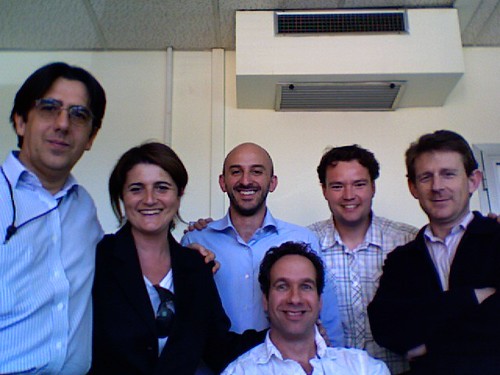
The development team

E.g. to explain it a bit: Hofstede is using Uncertainty avoidance as a differentiator for intercultural audience. People from a culture with a high score on uncertainty avoidance will prefer highly structured and leading learning content with a clear and straightforward language. People from cultures with a low uncertainty avoidance will prefer more explorative, open learning situations and content. An example of a country with low uncertainty avoidance is The Netherlands (score 51/100), a country with high uncertainty avoidance is Greece (score 95/100). We will create the course in such a varied way that the preferences will lead us to the conclusion if the Hofstede model is suitable for e-Learning and new generations as well.

The course will start on 21st of May and will have duration of 6 weeks. Every week will have a Teaser, a WBT, a learner generating content activity and a Reflection activity. We will use Moodle as the learning platform and eXe as the WBT creation tool.

If you are interested in participating in the course, just drop a mail or reaction.

Saturday, April 07, 2007

Google Maps for learning!

It was already possible to create your own Google Maps. But some programming skills were needed.

Not anymore. With the new Google Maps it is a piece of cake to create your own map. You can draw lines and shapes, you can add your own text, photo's and video's and you can publish your map to the web and share it with your friends.


Or with your learners?! Kids can bring their own neighbourhoods to life with pics and explanations. Let them give their own view and let them enrich the Google map in their own way. This could be a fascinating learning experience. Geography can be learned from a total different perspective. You can learn about different countries in a truly constructivistic way. And why not a project with kids in different countries? Let's exchange images and ideas.

WOW, wish for a moment that I was an elementary school teacher again!

Please check the English or Dutch website.